Client collaboration perfected for social media managers and agencies.
The most premium client experience for presenting, reviewing and approving social media creative. Approvals flow into publishing and reports, on boards shaped to your workflow.
Rated by 200+ teams already inside
14 days free. No credit card needed.
PlanPresentApprovePublishReport
Live board · click anywhere to interact
Built for modern social media managers and agencies
See what a premium client experience actually looks like.
Flexible boards you build around each service, planned in table, calendar, or grid. Clients approve or request changes, pin feedback onto images, and leave time-coded comments on videos. Then version history, auto-scheduling, and the analytics you report with. Just over a minute.
Life before
Posts in Notion. Files in Dropbox. Feedback split across three email threads and a voice note. You send the plan Monday, chase Wednesday, chase again Friday, then the client says “looks good” on a version you already changed. Whatever survives, you paste into Buffer by hand.
With Ovia
You send one link. The client clicks the exact frame they want changed and says why. You fix it, they approve, and it goes out on its own. Nothing gets exported, nobody gets chased by a human, and the report writes itself at the end of the month.
Maren FischerHead of Client Services · cardinal
“
We didn’t research this market. We run social media for 2,000 active clients at our own agency today. Every problem below is one we have had ourselves, whether you run three clients or three hundred. Ovia is what we built to fix them.
the team at ovia
The day-to-day, on repeat
Publishes natively toApproved posts go out on their own, with auto-retry.
FLOW The whole journey, on autopilot
Automate the busywork of every client journey with Flow
Workspaces set themselves up, reviews and reminders send themselves, and approvals slide straight into scheduling. You do the creative, Flow does the rest.
Seamless onboarding
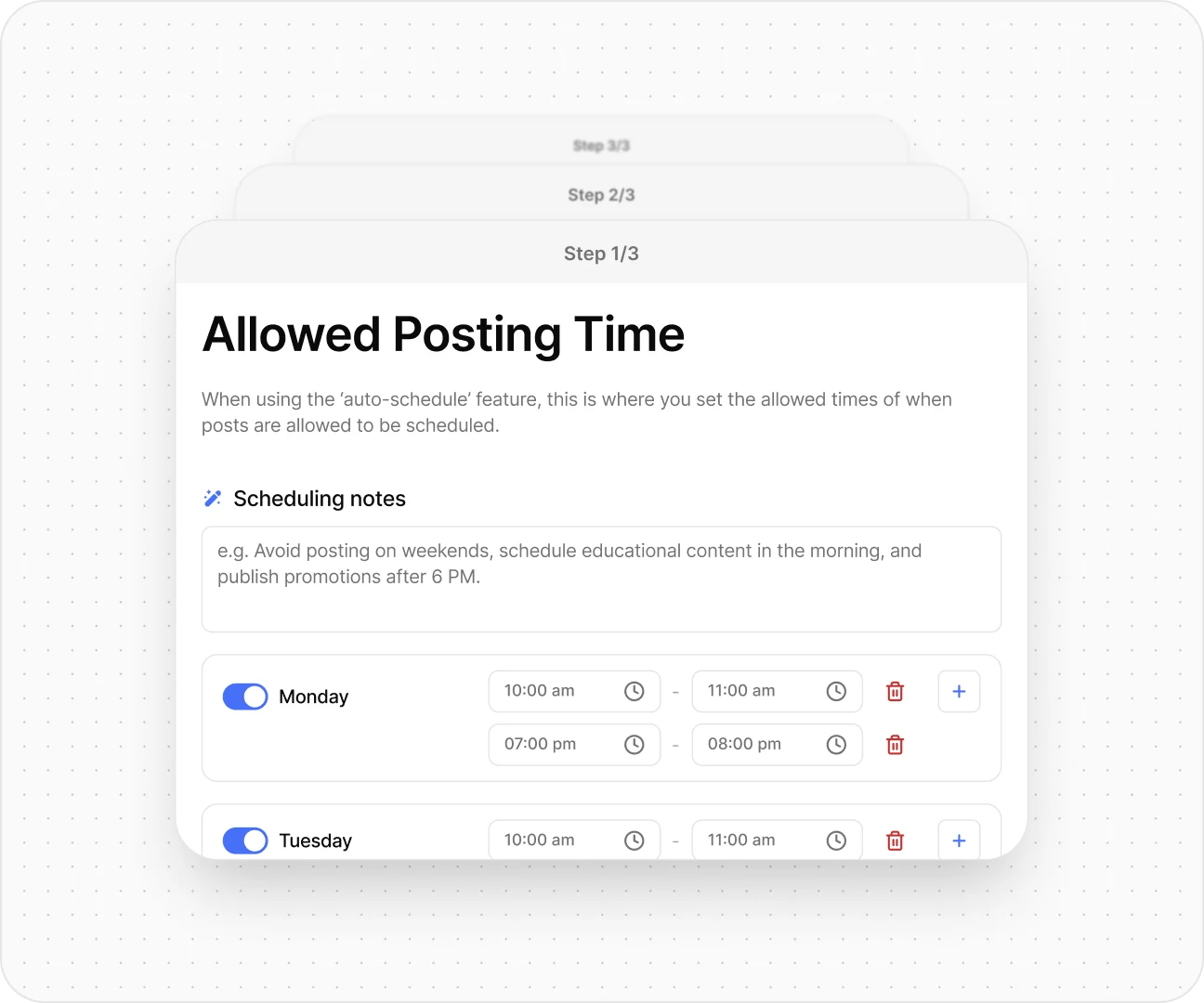
Apply a template and the board comes with it. Your client connects their own socials and picks their posting hours. No kickoff call.
Best-in-class review & approval
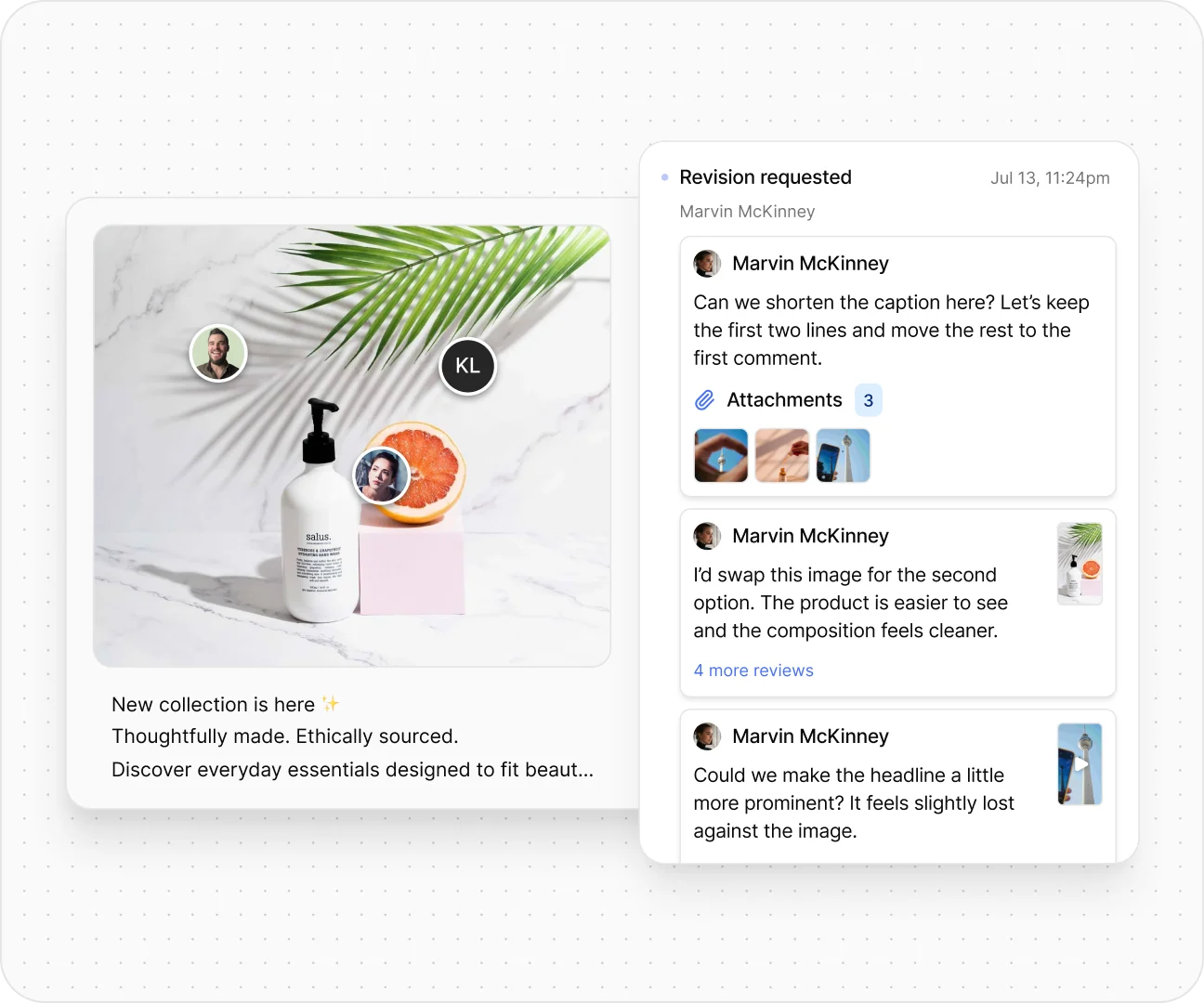
Your client opens one link, with no account to create and nothing to learn. Comments land on the exact spot, and Ovia sends the reminders.
Auto-scheduled the moment they approve
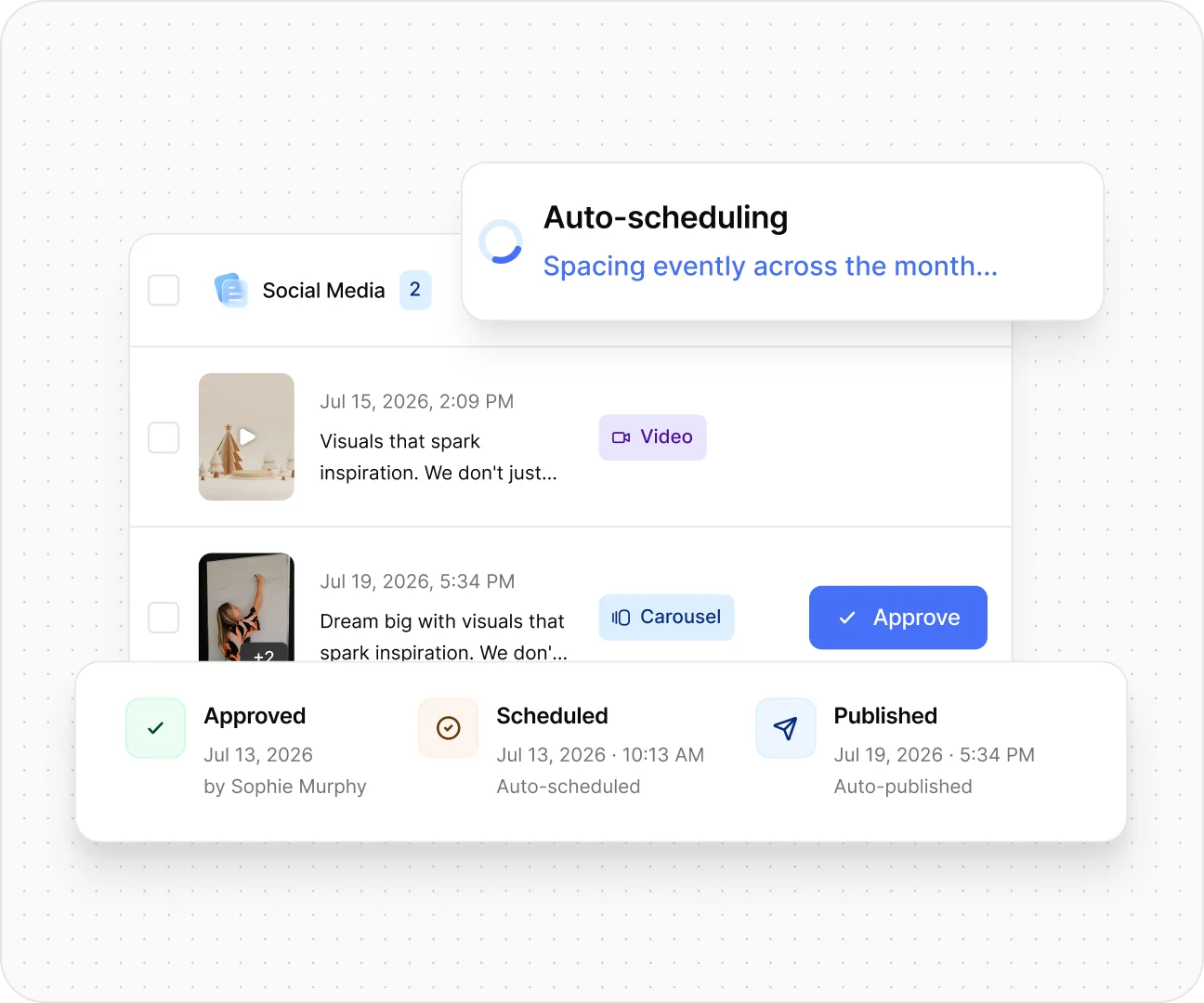
Approved posts drop into the slots your client allowed, caption and tags attached. Nothing to export.
Automate monthly reporting
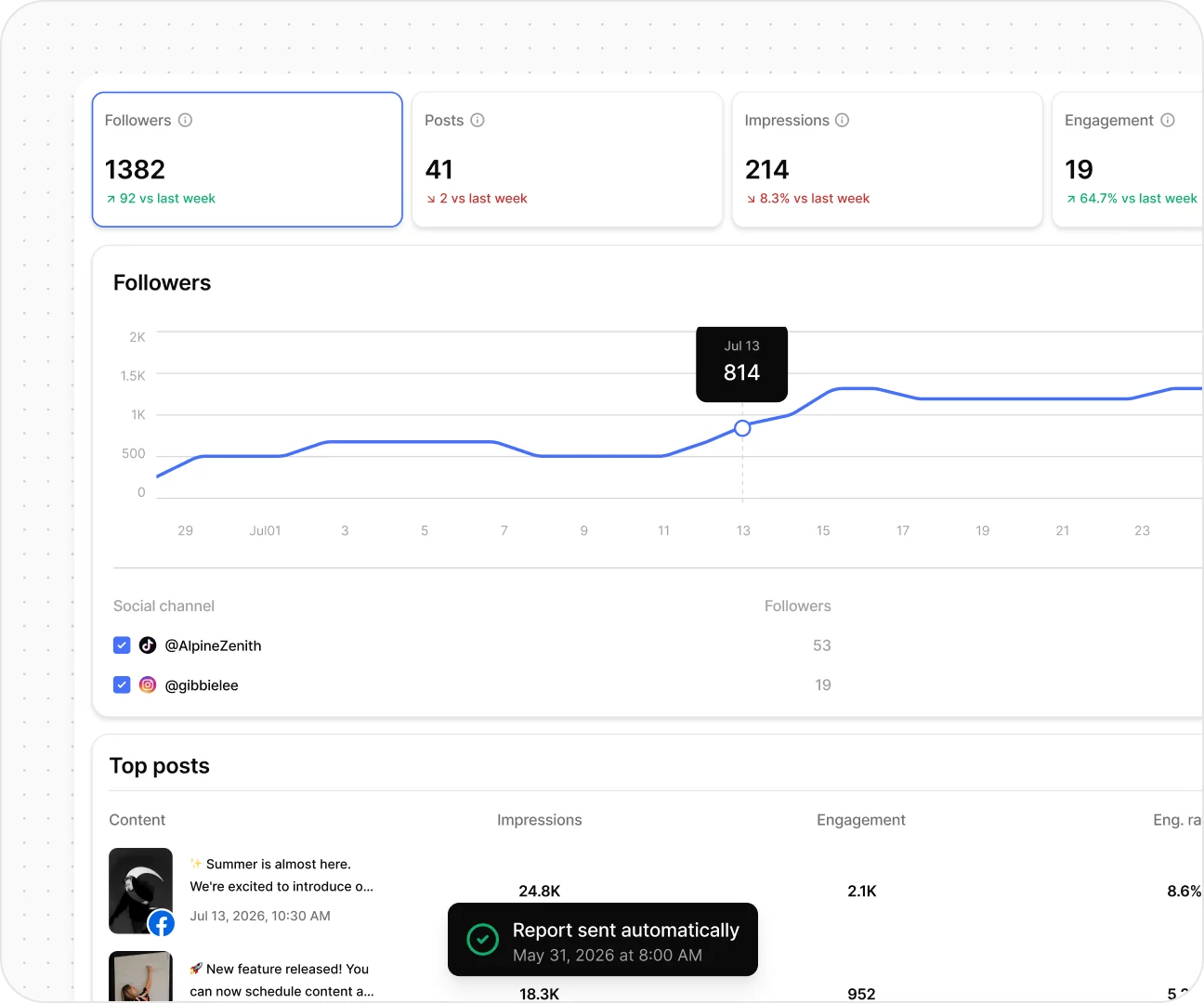
Numbers pull from the same board, wrapped in your branding and sent on your schedule. No deck to build.
and more!
Unlimited seats
Writers, editors, VAs, account leads: invite them all. No per-seat fees, ever.
Roles & scoped access
Admin, Editor, Reviewer, Viewer, and freelancers scoped to a single client’s board.
Deadlines & revision limits
Set a review window per client with optional auto-approve, and cap how many rounds a board allows.
Version history & approvals
Every caption, crop and change tracked, plus who approved what, in which version, when.
API & webhooks
Run your stack on top of ovia, subscribe to 30+ lifecycle events like socials.connected and post.published.
Clients need no account
They open your link and start reviewing. No signup, no password, nothing to install.
Team-only comments
Internal threads on any post. Debate freely. Clients only ever see the polished round.
AI that does the busywork
Thumbnails, per-network caption formatting, and the best slot to post in. It never writes the post for you.
Whatever you make this is where clients say yes.
Social Media
Paid Social
Creative
Video Production
see the insights!
No inflated claims
The numbers we can actually stand behind
2,000active clients our team runs social for today, which is how we know where the work breaksour own agency, still running
7networks published through each platform’s own API, with failed posts fixed and retried automaticallyno Zapier, no manual steps
“Having every client’s approvals in one queue has been a huge upgrade from the tools we’ve used before.”
Dana RibbleSenior Account Managerpalm & pine
“The part that sold the team was watching a whole month get approved without anyone sending a chasing email.”
Marco BelliniManaging PartnerLoomridge
$29for your first client, the rate only falls from thereno seats, no tiers, no gating
1 linkfor a client to review a whole month of worknothing for them to log into
At a $/mo retainer, Ovia is 2.9% of what you bill.
Collaboration
White-labeled client portal
Your branding, on your domain
Clients get their own space on your domain, with your logo, your colours and your sending address.
clients.yourbrand.com
No Ovia branding anywhere clients can seeYour logo on the portal, emails and reportsWorks on any device, nothing to install
Boards · 5 views
Five views of the same posts
One set of posts you can view five ways, with nothing duplicated.
TableCalendarGridGalleryFeed
Columns you configure like a spreadsheetGrid and Feed show how the profile will lookEvery view respects role permissions
Pin-point annotations
Comments attached to an exact spot
Comments attach to a point on the image or a timestamp in the video, rather than to the post as a whole.
1“warmer here”
Pins stay in place through every revisionTimestamped comments on videoNo guessing which image or moment is meant
Automated reminders
Follow-ups sent automatically
Ovia follows up on unreviewed posts, unconnected accounts and pending invites, on the schedule you set.
Day 2first nudgeDay 4second nudgeYou0 emails
Set per client, in your own wordingSent from your domain, not oursStops as soon as the client responds
Publishing
AI auto-scheduling
Times based on each account's history
Approved posts are scheduled using that account's own performance history rather than a generic best-time chart.
Time-sensitive posts keep their dateOther posts are spaced around themCalculated per account and per network
Auto-fix & auto-retry
Common failures fixed automatically
Formatting problems are corrected before publishing, and rejected posts are retried automatically.
4:5 crop→1:1 fixedretry 1 · retry 2
Aspect ratio, caption length, hashtag capsFailures explained in plain languageYou are notified if a post still cannot publish
Nothing fails silently
Every publishing failure reaches you
A post that cannot publish is retried automatically, and if it still cannot go out you are told which client it was and why.
failed→retriedthen flagged to you
Usually a revoked token or a platform outageYou are told which client is affected, and whyNo post disappears without a trace
7+ platforms
Published through each network's own API
Ovia connects to each network's official API directly, with no third-party automation in between.
No Zapier and no manual posting stepsFormatting handled for each networkMore networks added as their APIs allow
Reporting & team
White-labeled reports
Built from the board, sent on your schedule
Reports are assembled from the posts already on the board and sent on the schedule you set.
248kreach4.7%engagement46/46published
Your logo, your domain, your send dateAvailable in the client portal all monthNo slides to build by hand
Unlimited team seats
Team size does not affect your bill
Billing is per active client, so the size of your team does not change what you pay.
+ your clients, free
Staff, freelancers and clients includedNo need to share loginsRoles and permissions on every seat
API & webhooks
Connect Ovia to your other tools
A REST API and more than 30 lifecycle events you can subscribe to.
POST /v1/posts on: post.approved · post.published
Send data to your CRM, billing or dashboardsEvents for approvals, publishing and invitesKeys and scopes per workspace
100GB per client
100GB in every client workspace
Every client workspace includes 100GB for creative, drafts and published assets.
34GB used100GB included
Enough for months of video at full qualityArchived clients keep their full historyMore available if a client outgrows it
You pay only for active clients. When one leaves, archive their workspace and it stops being billed.
Why we actually built.
An open letter from our founder, written from inside the agency he still runs alongside Ovia, on 2,000 active clients today.
4 years in the trenches2,000 active clients200+ teammates
From the founder’s desk
Scottsdale, AZ August 2026
To every social media manager and agency owner reading this,
Every social media platform out there cares about scheduling and posting. None of them cared enough about review and approval, the interface where your team and your clients actually spend their day. Some have an approve button bolted on, but it was always an afterthought, never the product. So everyone built the same workaround: a content calendar in Airtable, Notion or ClickUp doubling as a client portal, feedback scattered across email and chat threads, assets buried in shared drive folders, review squeezed into a tool built for video, a scheduler touched only at the very end, to drop the approved file into a slot, and a report rebuilt by hand every month. Five different tools, still held together manually.
And your clients? They put up with it, and they remember it at renewal. Most are non-technical. They don’t want to log into five tools, remember five passwords, or learn a project-management app just to say “looks good.” They get confused, feedback stalls, and the whole experience leaves them frustrated with you.
If you’ve built one of those systems, you know the truth: it technically works, but you spend more time maintaining it than it saves, and clients still slip through the cracks. We built that system too. Then we replaced it.
That gap is the whole reason we built ovia. Scheduling is a tiny part of running social media for clients. The actual work, the part clients judge you on, is the back-and-forth of getting content approved, on time, without you chasing it. The existing platforms treated it as an afterthought.
The other thing nobody handled: what happens when an approval is late. On a scheduler, you scheduled the post first and hoped for the cooperation of the client. If they approved a time-sensitive post two days late, a human had to re-schedule the rest of the queue to make space. We flipped the order. In ovia, nothing schedules until it’s approved. The moment a client signs off, ovia picks the optimal slot, and if the post is time-sensitive, it rebalances the queue around it. No human in the loop.
By the time we shipped this, our own agency was running 2,000 active clients with 200+ teammates. That count is not a boast, it is just how we found every place this work breaks. Every fix in ovia exists because something broke on us first: auto-approve windows because busy clients stall calendars, reminder sequences because chasing used to be someone’s full-time job, auto-fix and retries because a 2 a.m. publish failure used to wake a human.
None of it only matters at that size. The same things break on client five as on client five hundred, they just break more quietly. This is volume one: collaboration, publishing, and reporting, done meticulously. The rest of the stack you juggle today, checkout, CRM, intake and messaging, ships on the same foundation, and every module lands on the public roadmap the day it’s ready. We wanted to ship the foundation first, and ship it well.
If you run social for clients, you’ve already paid for this product several times over: in subscriptions, in late evenings, in clients who churned because approvals dragged. Bring one client over and feel the difference in a week.
Edvin Mrkaljevic
Edvin MrkaljevicFounder & CEO · OviaAlso runs “one of the world’s highest-volume social media management agencies, managing social media for 2,000+ active clients.”
Vol. 02 · In active build
The rest of the stack, coming this year.
Collaboration, publishing, and reporting are the foundation. Everything else is in active build, and every module lands in the changelog the day it ships.
1We already run everything in Airtable, Notion, or ClickUp. Why switch?−
You probably won’t replace them entirely, and you don’t have to. Those tools are fine for general operations. Ovia takes over the client-facing production workflow: planning, review, approval, publishing, and reporting. Your PM tool goes back to doing what it was actually built for.
What Ovia does replace is the fragile layer on top, the formulas, the Zapier automations, the “here’s how we work” docs, the copy-paste publishing at night. Same outcomes, none of the maintenance.
2Can clients review and approve without creating an account?+
Yes. You send one clean link. They open it, see their content exactly as it will appear live, leave comments pinned to the exact frame, and approve, no signup, no app download, no training call. If they can comment on a social media post, they can use Ovia.
3How much setup does it take?+
Almost none. Ovia is built from four years of running social media at our own agency, 2,000 active clients today, so the workflow works out of the box: workspace templates carry board structure, posting cadence, and approval rules to every new client. Customize columns and rules when you want to, there are no formulas or brittle automations to babysit.
4What counts as an active client, and what do seats cost?+
You pay only for active client workspaces. Your team is unlimited and free, admins, editors, reviewers, and so are your clients and their stakeholders. When a client leaves, archive their workspace and it stops counting towards your bill.
5How are approvals documented?+
Every approval is logged: what was approved, in which version, when, and by whom, alongside the full comment and revision history. When a client asks “who signed off on this?”, the answer is one click away. It protects you and removes every ambiguity from the relationship.
6Can we white-label the client experience?+
Yes. The client portal and reports carry your logo and your colors, clients experience your brand, not ours. Automated reminders and review requests are sent under your name too.
7What happens after the 14-day trial?+
Nothing surprising. Every plan starts with 14 days free. We don’t take a credit card at signup, so we can’t charge you automatically. You’ll get a reminder before the trial ends; continue by picking a plan, or your account simply pauses, no charges, no data loss. Reactivate anytime.
Client collaboration, perfected. The busywork, automated. Publishing that never fails and reporting that renews the retainer. Doors open September 1st.








 .
.
 Airtable
 Notion
 ClickUp